
GuidesApril 18, 2026
Notion CMS: Use Notion as a Content Management System
Notion has databases and rich content editing — but can it work as a real CMS? Here's what it handles, where it falls short, and how to bridge the gap.
12 min readSee it in action
From a single click to a live WordPress post — markdown converted, images uploaded, featured image generated, SEO set, post published. No plugins, no copy-paste.
01
Markdown → Gutenberg
02
Image hosting
03
AI featured image
04
Rank Math SEO
05
Publish to WP
Three ways agents call it
Drop the MCP config into your IDE — your agent gets 13 publishing tools without leaving the terminal. One call runs the full pipeline.
Wire Notipo into n8n, Make, or Zapier with a single HTTP POST. Auto-publish from your scheduled or event-driven pipelines.
npx notipo posts create. Or POST /api/posts/direct. Same pipeline available from any backend script or CI job that speaks HTTP.
Every blog post on notipo.com/blog was published through Notipo's own CLI — same code path you get. Including this site's 30+ articles cross-posted to dev.to/@kfuras. Built and shipped by Kjetil Furås. You get exactly what we use ourselves.
Unlike WP MCP Ultimate, Vibe AI, Easy MCP AI, AI Engine, or WordPress.com's MCP server, Notipo runs outside your WordPress install. No plugin to install, no PHP to update, no admin-attack-surface added — your agent talks to Notipo, Notipo talks to the native WordPress REST API.

Pricing
Start free with 5 posts a month. Upgrade for unlimited posts, AI featured images, and full API + agent access. Cancel anytime.
Personal blogs and getting started.
Serious publishers and AI agent builders.
No credit card required
All plans include the full MCP server, REST API, and CLI. Cancel anytime — your posts stay on WordPress.
How it works
Write your post, click publish, and Notipo handles the rest — images, SEO, featured images, and formatting.
Open the built-in markdown editor and start writing. Toolbar shortcuts, slash commands, drag-and-drop images, and auto-save keep you in flow.
Images are uploaded to WordPress, featured images generated, code blocks formatted, and Rank Math SEO metadata applied — all automatically.
Your post is live on WordPress — or saved as a draft for review first. Edit and re-publish anytime with one click.
Free plan, no credit card. Publish your first post in under 10 minutes.
Features
One pipeline from idea to live WordPress post. Markdown to Gutenberg, image hosting, featured image, SEO, publish.
agents
Publish from Claude, Cursor, Claude Code, n8n, or any HTTP client. One call runs the full pipeline — content, images, SEO, and publishing — no glue code.
onboarding
Enter your site URL, click connect, and approve in WordPress — done. No application passwords to create manually. Works with WordPress 5.6+.
images
Auto-generated 1200×628 featured images. Choose AI-generated illustrations powered by Google Gemini in styles like comic book, watercolor, or minimalist — or use Unsplash photos with title overlay. Upload your own for full control.
hosting
Markdown image references uploaded to your WordPress media library automatically. No separate hosting or CDN needed.
seo
SEO metadata applied automatically on publish — focus keywords, titles, and descriptions written directly to Rank Math. No code snippets or extra configuration needed.
code
Support for Prismatic, Prism.js, Highlight.js, and WP Code blocks with automatic language normalization.
editor
Distraction-free editor with toolbar shortcuts, slash commands, drag-and-drop images, and auto-save. Use it directly or treat it as a fallback when no agent is at the keyboard.
notion
Already write in Notion? Connect your workspace and publish by changing a status. Webhooks, polling, instant sync — a power-user workflow on top of everything else.
See it in action
Write posts, manage publishing, and configure settings — all from one dashboard.
AI featured images
Notipo reads your post title, generates four on-brand variations, and uploads the one you pick at exactly 1200×628 — no Photoshop, no Canva, no stock imagery.
Optional: Notion integration
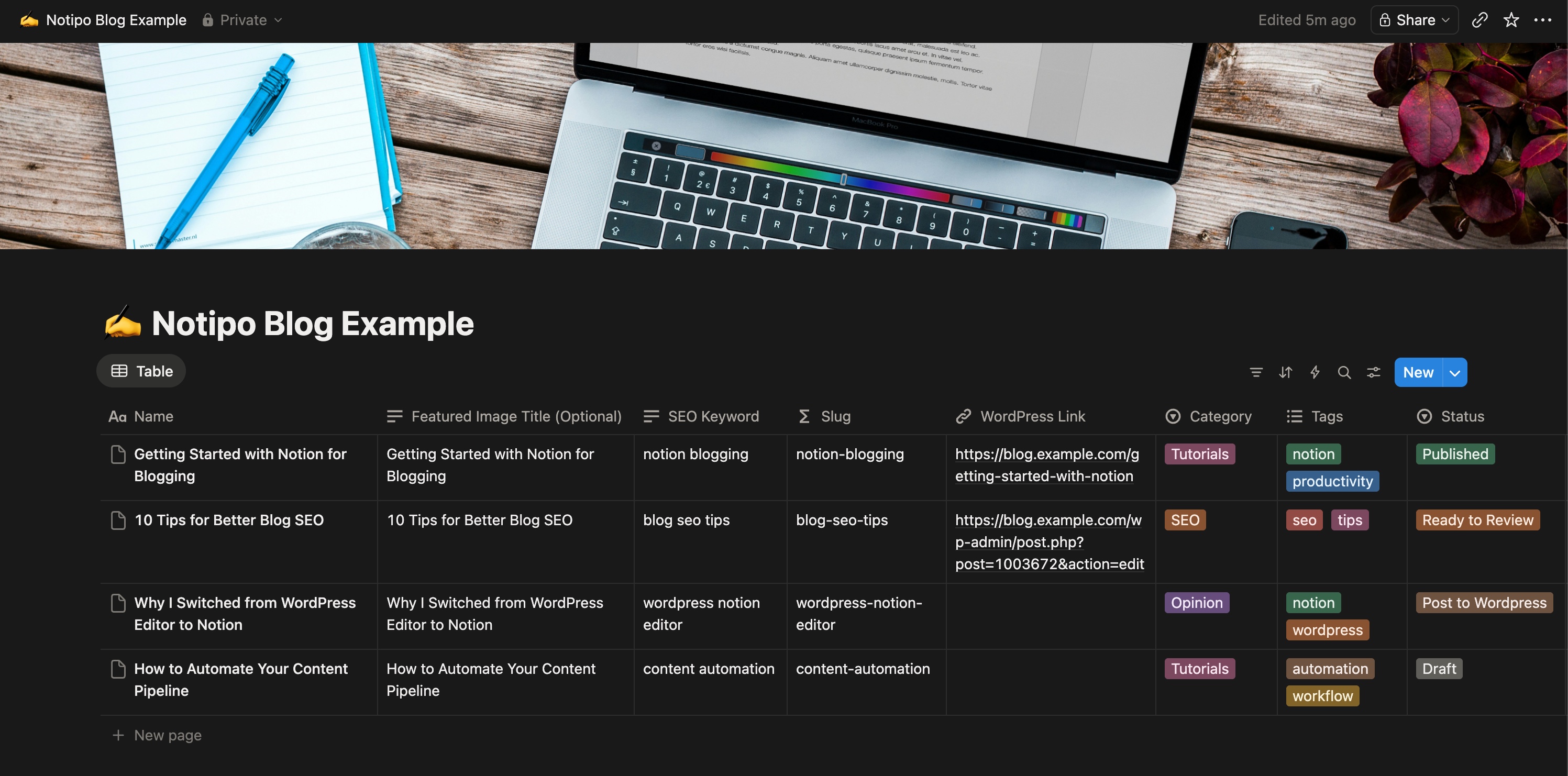
Link your Notion workspace and publish by changing a status — Notipo syncs content, images, and SEO metadata to WordPress automatically. Use our ready-made template to get started in seconds.
FAQ
Guides and tutorials on publishing from Notion to WordPress automatically.
Notion has databases and rich content editing — but can it work as a real CMS? Here's what it handles, where it falls short, and how to bridge the gap.
12 min read
Compare the best Notion to WordPress plugin options — WP Sync for Notion, Notipo, Zapier, and Cloudpress. Setup steps, pricing, and what each handles.
8 min readConnect WordPress, point your agent at the MCP server (or just write in the editor), and publish. Free to start — no credit card needed.
Start free